

Wondering how do you fix a ceiling fan from wobbling? In most cases, the culprit is loose mounting hardware, unbalanced blades, or accumulated dust — all of which you can diagnose and often resolve yourself. A wobbling fan is more than annoying; left unchecked, it can damage your ceiling and become a safety hazard.
Why Ceiling Fans Wobble in the First Place
Before you grab a screwdriver, it helps to understand what’s actually causing the wobble. Ceiling fans have several moving parts, and any one of them can fall out of alignment over time — especially in coastal homes around Torquay where salt air can accelerate corrosion on metal components.
The most common causes include loose blade brackets (also called blade irons or blade arms), an improperly secured mounting bracket at the ceiling, uneven blade pitch, or a warped blade caused by humidity. Identifying the root cause first saves you time and frustration.
Step-by-Step: How Do You Fix a Ceiling Fan From Wobbling?
Work through these steps methodically. Always switch the fan off at the wall and wait for the blades to stop completely before touching anything.
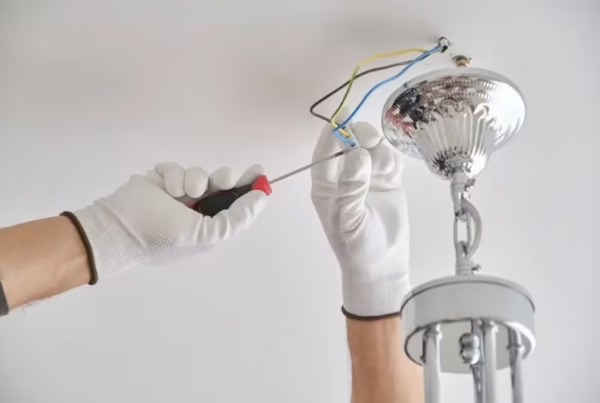
- Tighten the canopy and mounting screws. Use a screwdriver or small spanner to firm up every screw on the canopy cover (the dome at the ceiling) and the mounting bracket underneath. These loosen through vibration over months of use.
- Check the downrod connection. The downrod connects the motor housing to the mounting bracket. Make sure the locking pin or set screw is fully engaged — a loose downrod is a very common cause of wobble and can be dangerous.
- Inspect and tighten blade bracket screws. Each blade attaches to the motor via a blade iron. Check every single screw on every bracket — even one loose fastener throws the whole fan off balance.
- Measure blade pitch consistency. Use a blade balancing kit (available at most hardware stores) or a simple ruler to check that each blade sits at the same angle and height. Even a 2–3 mm difference can cause noticeable wobble.
- Use a balancing kit. Most ceiling fans come with a small plastic balancing clip and adhesive weights. Clip the balancing clip to the trailing edge of one blade at a time, run the fan, and note whether the wobble improves. Once you find the problem blade, apply the self-adhesive weight to the top centre of that blade.
- Clean the blades. Dust buildup on one side of a blade adds uneven weight. Wipe each blade thoroughly with a damp cloth, making sure to clean both the top and bottom surfaces equally.
- Check for a warped blade. Hold a straight edge along each blade. If one is visibly curved or warped — common in older timber blades exposed to Torquay’s humid sea air — it may need replacing entirely.
The Role of Blade Pitch and Balance
Blade pitch refers to the angle at which each blade is set relative to horizontal. Manufacturers engineer all blades to sit at an identical pitch — typically between 12 and 15 degrees for residential fans. When one blade iron bends slightly (from a knock or a child’s toy, for example), it alters the pitch and creates drag on one side of the rotation.
You can gently bend a blade iron back into position by hand, but take care not to over-correct. If the metal feels brittle or cracked, replace the blade iron rather than risk it snapping. Replacement blade irons are inexpensive and widely available at electrical and hardware retailers across the Surf Coast region.
Maintenance Tips to Prevent Future Wobbling
A little routine care goes a long way in keeping your fan running smoothly. Coastal living is wonderful, but salt-laden air does accelerate wear on metal fasteners and motor bearings.
- Wipe blades down every 4–6 weeks to prevent uneven dust accumulation.
- Run a quick screw-tightening check at the start of each summer before heavy use begins.
- Apply a small amount of thread-locking compound (such as Loctite Blue) to blade iron screws to prevent them vibrating loose.
- If your fan is more than 10 years old, consider having the motor bearings inspected — worn bearings cause wobble that no amount of balancing will fix.
- Ensure your fan is rated for outdoor or coastal use if it’s installed in an exposed area like a verandah or alfresco space.
When to Call a Professional
Some wobble issues go beyond a DIY fix. If you’ve worked through every step above and the fan still shakes, or if you notice any of the following, it’s time to call a licensed electrician: the mounting bracket feels loose within the ceiling itself, you can see damaged wiring near the canopy, the motor housing feels excessively hot, or the fan makes grinding or buzzing noises alongside the wobble.
Electrical work inside the ceiling — including replacing a mounting bracket, junction box, or fan motor — must be carried out by a licensed electrician under Australian electrical safety regulations. Attempting this yourself is illegal and dangerous. The team at BTD Electrical & Data on the Surf Coast handles ceiling fan inspections, repairs, and full replacements across Torquay and the surrounding region. If you’re unsure whether your fan’s wiring or mounting is safe, a professional electrical safety check is always a smart investment. Contact BTD Electrical & Data today for fast, reliable service you can trust.
Conclusion
Knowing how do you fix a ceiling fan from wobbling comes down to a systematic approach: start at the ceiling mounting, work your way down through the downrod and blade irons, then fine-tune with a balancing kit. Most wobble issues are straightforward to resolve with basic tools and a methodical eye.
That said, never ignore warning signs like loose ceiling mounts, hot motors, or damaged wiring — these require a licensed professional. For anything beyond a basic balance and tighten, reach out to the electrical repair specialists at BTD Electrical & Data to get your fan — and your peace of mind — back in perfect working order.
Frequently Asked Questions
Is a wobbling ceiling fan dangerous?
A mildly wobbling fan is usually more annoying than dangerous, but it can become a serious hazard if the mounting bracket is loose or the downrod connection is failing. If the fan sways noticeably rather than just wobbling at the blades, switch it off immediately and have a licensed electrician inspect the installation before using it again.
Can I balance a ceiling fan without a balancing kit?
Yes — you can use small adhesive-backed coins or washers as a temporary measure to test which blade is causing the imbalance. However, a proper balancing kit (available cheaply at hardware stores) gives you a more precise and permanent result. It’s worth the small investment for a smooth, quiet fan.
How long does it take to fix a wobbling ceiling fan?
For most households, a thorough tighten-and-balance session takes between 20 and 45 minutes. If you need to replace a warped blade or a bent blade iron, add another 15–20 minutes. A job requiring an electrician — such as replacing the mounting bracket or rewiring — typically takes one to two hours on-site.
Does humidity in Torquay make ceiling fan wobble worse?
It can, yes. The coastal humidity around Torquay and the wider Surf Coast can cause timber blades to absorb moisture unevenly, leading to warping over time. It can also accelerate rust on metal blade irons and screws. Choosing fans with composite or ABS plastic blades, or fans specifically rated for humid and coastal environments, significantly reduces this risk. For more about what we do, visit our homepage.